
This plugin will create the vertical marquee effect in your website, if you want your post title to move vertically (scroll upward or downwards) on the screen, use this plugin. We are using the simple marquee tag to move the text vertically and tested this plugin in all the leading internet browsers. admin option available to set the scroll effects and colors scheme.
Features of this plugin
- Light weight
- Loads very fast
- Pure HTML tags
Plugin live demo available in this page. You may also be interested in Horizontal scrolling announcement WordPress plugin.
Live demo
Admin management
In your WordPress administrator section go to the Settings menu and select the Vertical marquee post title menu to configure this plugin.
Scroll Amount: This is used to organize the speed of the scrolling, the only integer allowed and a higher value provides a faster speed
Scroll Delay: This is used to reduce the speed of the scrolling, the only integer allowed.
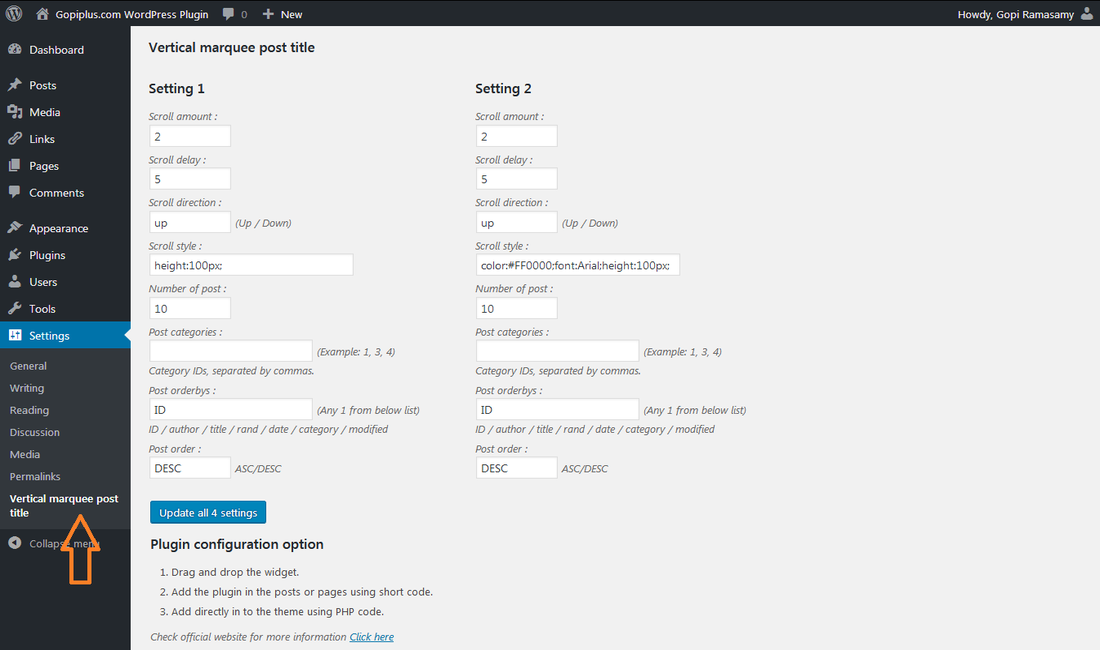
Plugin configuration
Drag and drop the widget: Go to the widget menu and drag and drop the Vertical marquee post title widget to your sidebar location.
Shortcode for pages and posts: Use the below shortcode in the pages and posts.
[vmpt setting="1"][vmpt setting="2"][vmpt setting="3"][vmpt setting="4"]Add directly in the theme: Add the below PHP code in your theme PHP file, for example, if you want to add this slider in your website footer, just activate the plugin and add this code in the footer.php file.
<?php echo do_shortcode( '[vmpt setting="1"]' ); ?>Frequently asked questions
Q1. What is Scroll Amount, Scroll Delay?
Scroll Amount: This is used to organize the speed of the scrolling, the only integer allowed and a higher value provides a faster speed
Scroll Delay: This is used to reduce the speed of the scrolling, the only integer allowed.
Q2. Can you explain the shortcode?
[vmpt setting="1"]setting: This setting is available in the admin dashboard.
Download location
http://www.gopiplus.com/work/2012/09/02/vertical-marquee-post-title-wordpress-plugin-download-link/
Official plugin page
http://www.gopiplus.com/work/2012/09/02/vertical-marquee-post-title-wordpress-plugin/