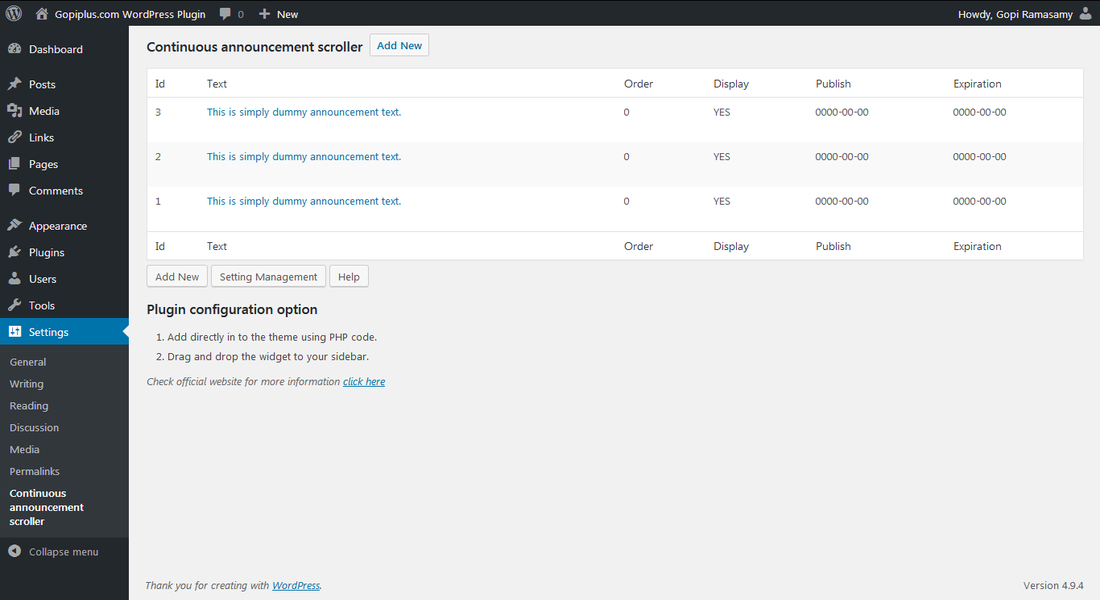
Continuous announcement scroller
March 24, 2012 |
Posted by:
Gopi R |
Wordpress plugin |
125 Comments |
Continuous announcement scroller wordpress plugin create an announcement widget in the website, it’s not a simply message display instead the message will scroll vertically from bottom to top like roller and many message display at the same time. This plugin will support multilingual content. There is separate text management page available in the dashboard to add the announcement content.
Features of this plugin
- Easy installation.
- Widgets, so you can add pretty much anything.
- Easy scroller setting.
- We can arrange the message order easily.
- We can disable the message temporary.
- Display many message at a same time.
See live demo on sidebar; Do you want to scroll the rss feed instead of own content? use continuous rss scrolling wordpress plugin.
Installation instruction
Method 1
- Download the plugin continuous-announcement-scroller.zip from download location.
- Unpack the continuous-announcement-scroller.zip file
- Extract the /continuous-announcement-scroller/ folder.
- Drop the continuous-announcement-scroller folder into your ‘wp-content/plugins’ folder.
- In word press administration panels, click on plug-in from the menu.
- You should see your new continuous announcement scroller plug-in listed.
- To turn the word presses plug-in on, click activate.
Method 2
- Go to ‘add new’ menu under ‘plugins’ tab in your word-press admin.
- Search continuous announcement scroller plugin using search option.
- Find the plugin and click ‘Install Now’ link.
- Finally click activate plug-in link to activate the plug-in.
Method 3
- Download the plugin continuous-announcement-scroller.zip from download location.
- Go to ‘add new’ menu under ‘plugins’ tab in your word press admin.
- Select upload link (top link menu).
- Upload the available continuous-announcement-scroller.zip file and click install now.
- Finally click activate plug-in link to activate the plug-in.
Plugin configuration
Option – 1 : Go to widget link under Appearance tab, Drag & drop continuous announcement scroller widget into your side bar.
Option – 2 : Copy and paste the below mentioned code in desired template location ie your PHP theme file.
<?php if (function_exists (cas)) cas(); ?>
Frequently asked questions
Q1. Can I display more news at same time?
Yes, we can add more message at same time, use text management page to add more announcement.
Q2. Can I display announcement in random order?
No, In this version(1.0) not available, i will include this in the next version.
Q3. Can I arrange the news scroll order?
Yes, We have option in the admin text management page(Property : Display Order)
Q4. Can I hide the any news temporary?
Yes, We have option in the admin text management page(Property : Display Status)
Q5. Can I set expiration for announcement?
No, In this version (1.0) not available, i will include this in the next version.
Q6. Can I add font color?
Yes, simply add your html content with font color in the text box. See above demo.
Q7. Why my message content out of range?
This is the continuous scroller, so we need to provide equal space between message, for this case just arrange the Scroller height in the scroller setting.
Q8. How many message displays at same time?
You can set this in the scroller setting page.
Q9. What is “Display number of record at the same time in scroll”?
This property is to set the no of record to display (in front end) at the same time.
Q10. What is “Enter max number of record to scroll”?
This property is to fetch no of record from table.
Download location
http://www.gopiplus.com/work/wordpress-plugin-download/
Other announcement plugin
- Announcement and vertical scroll news
- News announcement scroll
- Continuous rss scrolling
- RSS scroller
Donation
All modules, plugins in this website are completely FREE. If you find the software useful please consider making a donation(PayPal). All donations will go towards improving this web website and maintenance.


Hi, Post your comments, doubt, suggestion, feed back with proper email address.
Hello, and thanx for releasing this plugin for free
One question: can it be possible to add one (other) widget – let’s say, ‘recent comments’ or ‘latest posts’ – inside your plugin container, in order to make a scrollabler text? In other words, a piece of code?
(sorry for my english)
Oh, sorry, this is my first coffee of this day, i’m a little dizzy !! I’ve just your others plugins – exactly what i want!
thanks man.
You make my day
Adex
Thanks
Hello,
Can you tell meu how can I display news with different colors, like in your demo?
Thanks,
Dragos
Its very simple, just add your HTML content directly in the text box.
Example :
This is simply dummy announcement text. Update this in text management page.how do i put text into html format there is no way to change color other that trying to cut paste from a word doc but that didnt change the color what am i missing also is ther there a stop feature during scroll over to allow reader more time to read can you slow down or speed up the scroll? thank you
How i canOpen the link in a new window?
At the moment it opened in same window.
Find this “$cas_post_title” variable in the main plug-in php file(continuous-announcement-scroller.php) and add the target attribute for that anchor tage.
under $dis_height —Modify href link to include target as shown
Under $cast_post_title = trim($cas_post_title);
modify href to resemble:
Modify codes to include target attribute below in $dis_height and $cast_post_title
‘”“‘
‘”“‘
Modify codes to include target attribute below:
in $dis_height and $cast_post_title respectively:
a href=’$get_permalink’ target=’_blank’>
$get_permalink\’target=\’_blank\’>
Hi,
I’m looking for a plug in that will offer up to 10 lines of text, that will appear one by one and then scroll downwards continually. This will need to appear over a graphic on the homepage only. I can’t therefore enter into the php file on the header. I have very little knowledge of html so any help would really be greatly appreciated.
Thank you.
Hi there,
Great plugin, its very simple and gets the job done.
I’ve been playing a little bit in debug mode and have seen a number of warning messages pop upm which I do not know how to solve.
Can you please assist?
Notice: Use of undefined constant cas – assumed ‘cas’ in …. on line 12
Notice: Undefined variable: cas_html in ….wp-content/plugins/continuous-announcement-scroller/continuous-announcement-scroller.php on line 67
Notice: Undefined variable: cas_x in ….wp-content/plugins/continuous-announcement-scroller/continuous-announcement-scroller.php on line 73
Notice: register_sidebar_widget is deprecated since version 2.8! Use wp_register_sidebar_widget() instead. in …wp-includes/functions.php on line 3237
Notice: register_widget_control is deprecated since version 2.8! Use wp_register_widget_control() instead. in …wp-includes/functions.php on line 3237
Thanks in advance,
Darko
I have a family site and learning about wordpress. i love this plugin. Very simple to put on my blog for a person who does not know a lot about web codes. Thank you very much for sharing.
Is there a way to control the speed of the scroller text?
Thanks.
yes this is possible, in the plug-in js file find the line
setTimeout(“cas_scroll();”, 10);
setTimeout(“cas_scroll();”, 2000);
and update that number to increase or decrease the speed of the scroll.
Is it possible to set the speed as well?
is there a way to have the plugin show up with different content on pages independently? (i.e. on the widget side independently for each page)
Meaning, can I have one scrolling message on Page #1 and another (different) scrolling message on Page #2 etc…. ?
I would like to use it to display testimonials, but testimonials that are specific to each page.
would also like to know if there is a way to create different widgets for different pages as mentioned above.
I’d like to do this too. Have you figured out a solution?
how can i edit the CSS of this ?
i’m israeli and i want the text-align to be “right”.
and i wuld like to add a border to the widget,
is it possible ?
i have seen that you use
but when i write in my style.css
.wrap {
text-align:right;
background:#f1e5f3;
}
it’s not doing nothing.
thank you
would be nice to be able to control the color of the text,
thanks for the plugin ,
Marc
thanks a lot for the great plugin! there is one thing I’d really like to see in the future releases – a possibility to use language tags (i.e. [:en] or ) for multilingual blogs. check out my site – I have to put english text in bold and russian in italics. would be awesome if i could omit the unneeded language altogether.
tipkin
Hi. thank you for creating this plugin. I loaded it on the homepage of my website by means of a php executable plugin for php placed in posts or pages.
In other words, I wrote [exec] cas(); ? [/exec] instead of
At this point, I am only able to see the first announcement on the list. There is no scrolling. Is there anything that I am missing?
Thanx in advance
Ajen
Helllo, thank you for creating this wonderfull plugin. Is it possible to add a option for turning the hyperlink on/off. On this moment you have to put a hyperlink but i don’t need that. It also change the layout of my text and pictures (i have a line under a hyperlink, so it doesn’t look great for me)
It’s a suggestion, i hope you can help me..
Thanks.
Wienjo
Just put a # in the link field. The form will work and there will be no link. I am he same as you..dont want links
Dear Gopi,
Many thanks! I think this is an extremely useful and elegantly designed plugin. I’m wondering whether it is possible to change the scrolling speed, to make it a bit slower.
Thanks!
I apologise, I swear I did RTFM but missed the answer: it’s a couple of comment up in this same page. Sorry!
This was just the plug in I was looking for, many thanks!
Thank you for your plug in. I was wondering if there is a way of stopping the scrolling when the mouse is on the announcement to allow the reader more time to read it. Thanks for your time.
Sorry for my English … your plugin is excellent. Just one problem: do not work for me locally with IE6 while on your site yes.
Did you make a change? If so which one? Thank you in advance
How can I link to an email address?
I’m trying this plugin for a simple scrolling list of names: a long column. I don’t need or want the link option, and in fact will need to turn it off because most or all of the names won’t have links.
Can I do that with this plug in? or do I need to keep looking? Otherwise, it looks great!
Names means? you want to scroll registered user or another name?? It will scroll/display admin entered content only.
Yes I want to know about the link also – I was putting the link in with my text so I don’t know what to put in the link box – hopefully someone will respond shortly!
Hello,
I too am interested in removing the link requirement.
For now, I’ve used # however, as we know, it still appears as a link to readers.
Gopi, do you have any suggestions as to how we can edit the code so the scroll doesn’t require links?
Thanks for a really slick, simple, versatile plugin.
Respectfully -Barb
Gee – you’re quick hahaha
Just found the news announcement plugin precisely what I needed. Thanks.
hey thanks for your plugin, i have used that, but problem is that: it is very fast than wat i want, cant i set ?
Hi. The plugin is great. One question: Is it possible to shorten the amount of space between posts differently on a post by post basis? That would help since I have one post that is really long (and flows into the post after it) and one really short one (that has a big chunk of empty space below it). Any help is appreciated. Thanks. David.
Is there a way to get the links to open in a new window? Can I add target=”blank” somewhere?
Thanks!
Oh, I see the answer above….will give it a try.
“How i canOpen the link in a new window?
At the moment it opened in same window.
Reply
*
Gopi R says:
September 19, 2010 at 5:40 am
Find this “$cas_post_title” variable in the main plug-in php file(continuous-announcement-scroller.php) and add the target attribute for that anchor tage.”
There are a bunch of these $cas_post_title” in the code….which one or ones do we add this to, and could you show me what the final code should look like for this snippet?
Thanks
I figured it out….for anyone else looking to open links in new windows, here’s where you add ‘target=blank’.
In this file: (continuous-announcement-scroller.php):
$cas_x = $cas_x . “cas_array[$cas_count] = ‘$cas_post_title‘; “;
$cas_count++;
$cas_x = $cas_x . “cas_array[$cas_count] = ‘$cas_post_title‘; “;
$cas_count++;
$cas_x = $cas_x . “cas_array[$cas_count] = ‘$cas_post_title‘; “;
$cas_count++;
WTF is wrong with this …I can’t get all the code to show up.
Ugh, w/e, I got it.
Such a great plugin!
I have two instalation of wordpress, in two different subdomains. Have installed thge plugin on one of the wordpress and typed in A LOT of announcements.
Question: how can i copy the content (the announcements) to the other instalation too so i don’t need to type in all the announcements again?
Is there a file which stores all the text i can copy in the plugin directory or smth like that?
This question is also good for when backing up…
Thanks!
You did a good job!
Nice, handy little widget.
One little question –
When anyone registers on the site they can see and easily edit the scroller.
How can I disable this ?
Thanks
Tony
hi new version updated with security..
3.0 bug has been fixed.. please use 4.0
Can the order be reversed? I am assuming I can decrement a variable in a loop (rather than incrementing), but I keep “breaking” it.
Hello, your plugin – what I was searching, the only question is: How do so on the same page had two widgets with different announcements?
Thanks, and forgive me for my english.
Can someone please tell me the main difference between :
Announcement and vertical scroll news
and
Continuous announcement scroller
Thanks.
Can someone please tell me the main difference between :
Announcement and vertical scroll news
Continuous announcement scroller
and
News Annoncement scrow
Thanks.
Announcement and vertical scroll news & News announcement scroll both same plugin. the second plugin automatically gone from wordpress directory so create same plugin with different name.
Continuous announcement scroller : in this plugin we can show more then 1 record at a time. this is not possible in the other plugin.
Thanks for the plugin.
How can I enter a message without a link.
After I enter the message, it requested “Please enter the link”
Enter “#” in that link text box.
Thanks for your help.
In how to control the speed of the scroller text, you said this:
yes this is possible, in the plug-in js file find the line
setTimeout(“cas_scroll();”, 10);
setTimeout(“cas_scroll();”, 2000);
and update that number to increase or decrease the speed of the scroll
Pls. in which order? do I need to change both 10 and 2000 to a lesser digit to decrese the speed? and should it be in the order of 10, 20, or can it be any digit number?
Thanks once again.
Samuel.
I am having a problem seeing my continuous announcement scroller…why can’t I see my content?
help!
Can u tel me what error ur getting ???
Nice! It’s so onerous search out good high quality data on the web right now from educated sources, it’s all wannabe’s and reused content with only a few exceptions. I hope you keep up the good work and I most likely be back to read extra of your posts in the future!
Great plugin dude. Just wish you could alter the speed and it didn’t appear as a link even if you use ‘#’.
is there a way to have the plugin show up with different content on pages independently? (i.e. on the widget side independently for each page)
Meaning, can I have one scrolling message on Page #1 and another (different) scrolling message on Page #2 etc…. ?
I would like to use it to display testimonials, but testimonials that are specific to each page.
This is possible.. but u have to do some small code changes in the PHP file.. Just read the file URL based on the file url u retrieve the announcement from DB. Example in the website each page am displaying only one widget.
Gopi, can you explain theis in more detail please? I’d also like to display the scroller with different content on different pages. Can you share the php code we need to change please?
thanks for the great plugins!
Nice plugin. I need to available this plugin settings to editor user, but it is not available when I am login through editor user. Is there anyway to change this option?
Is it possible to use this plugin/widget for an entire page? I want to set this up so that it will scroll the announcements for the entire page and not as a sidebar. This will be used on a large dontated HDTV to scroll school announcements. I know it probably is I just need to be shown how to accomplish it. Any takers?
At present only sidebar option available . in the next version we ll implement the page short code.
Have you got the solution, if yes then please also let me know
Can i put this News Scroller in a WP-Page, I have lots of page but i want to show in Only one page.Pls tell me how can i done this thing
No at present this support only widget, in the next version ill try to add short code………
When are you planning to release the next version with the short-code?
I know you answered this question above on Feb 16th but I’m fairly new to php. I can find the line where the ‘target=blank’ is to be inserted to but the code in the version I have is much longer than what is written in the Feb response. No matter where I put the target code I either get an error or the scrolling freezes. Can you please just write of the full line code so that I can just copy and paste in the new code and finally get it to work. This is a great plugin and is really a strong attraction on my website. Thanks
PS I’m using Continuous Announcement v5.0
Thanks for a great plugin – when do you plan on a new version with random display order feature?
Hi Gopi – I’m evaluating your plugin as I build a client site. I like a lot of things about it. But I need to use it in more than one type of sidebar on the site. When I drag it into a categories sidebar, for example, it is no longer available to slide into a pages or other sidebar. Is there a way to deploy it in multiple sidebars? Thanks for your help.
Our site is running wordpress 3.1.3 and using the Continuous announcement scroller plugin and is working perfectly, except that I can’t add new content to the scroller. We already have 5 links, using order 1,5,6,7,8 (created by a previous administrator), but when I try after insert message do not get anything (using order 2,3, 9 without sucess.
What could be the issue.
Thanks.
Just a suggestion. Background and timer options aren’t usually referenced in the description of these plugins. Maybe ‘Multiple Category Selection Widget’ plugin with cats for features can also help users here scout the right scroller : )
Hi Gopi, two things now:
1. Your plugin appears with no sidebar background or border, and I see no way to set a background or border. Please note that my theme has several ways to set a background or box, but not when the widget can’t be placed within a text widget. How do I accomplish this? The site: http://www.thomaswatsonconsulting.com/gosdentodd/raving-realtors
2. any answer on my question from July 19?
Thanks for any timely help you can provide.
Answer for July 19 Q : am check that option, at present problem is if we add more then 1 scroller in the same page it gets conflict.
Answer for this Q : Try to add the HTML content in the announcement
ex: if you want diff font color ,
<DIV style=’background-color:#00ff00;’ >
Your content here.
</DIV>
Just to say have been looking for a plugin that provides a news update for ages. Really appreciate it and will donate now.
I would like to change the colour of the fonts but have no code experience. Any help many thanks
Hi just installed RSS Scroller and it is brilliant! Spare one issue. I seem to be having trouble styling it. Been trying to give it a background image and it’s not playing game.
Our site is running wordpress 3.1.3 and using the Continuous announcement scroller plugin and is working perfectly, except that I can’t add new content to the scroller. We have 5 links, using order 1,5,6,7,8 (created by a previous administrator), but when I try to insert a message don’t get anything (using order 2,3,4,9… I deleted one of the entries and still can’t add new content. Also check the settings and the Enter max number of record to scroll: is set to 20
What could be the issue?
Thanks.
hi, can we put an image on the box?
use information reel plugin..
hi.
how can i change the font size ?
thanks
U can add the HTML content…
Thanks so much for this great plug in. I have it installed, formatted and running just fine. I would like to slow down the pace of the scroll. Can you provide some guidance on how to do this.
Dear Admin first of all I am really thankful to you for this great plug in. I just have gone through all the comments and read the way to add a blank target but still unable to that with this tag “$cas_post_title”. If you don’t mind please give the correct syntax and where should I change it.
Waiting for your reply
Where to add HTML content to change the color of the font. please specify.
i want to add text in urdu language can you please tell me how can i do that using this plugin?
thanks
Hi,
First of all thanks for the great plugin.
i have not the issue but requirement, i want to give privilege to editor to add delete and edit news as well as the administrator.
hope u reply soon.
Hi, I have used this on my other website however recently I wanted to use this on my current website and it shows up in firefox but cannot be seen in chrome or IE for some reason. What should I do? I have cleaned the browser cache and history and all that but nothing works.
Like many I like the plugin but it goes too fast to be useful. I think I figured out how to slow it down.
To slow down the scroll go into Plugins —> Editor and go to
“continuous-announcement-scroller/continuous-announcement-scroller.js ”
Last line says:
“setTimeout(“cas_scroll();”, 2000);”
I changed it to 4000 and it has slowed down to an acceptable speed.
Good luck.
can i manage the time delay between diffrent news??
can i make the news stop when the visitor brings the cursor on the news and make the news moving again when visitor takes off the cursor from the news??
reply me its urgent
re: Changing colors in the text …
1. These plugins are an extraordinary collection – and I am so grateful that you are offering them to the public. Thank you!
2. Criticism. references to the changing the colors in the continuous scroll text above. Oh gosh. Awful. I am a pretty smart guy and I am indeed more confused than ever. I know we may seem ungrateful for asking for coherent comments and responses (and documentation) from someone giving away such plugins for free! But really! You just keep repeating the cryptic “add html” to the text without EVER giving one example. Directing us to the demo on the right-side is NOT an example of HOW to do it.
It is not straightforward. I personally have tried to add HTML to the lines in the ticker, and it does not always end up the way I would expect.
so … are you adding code like message text or
etc
or something else.
since there are several asking about this, why not merely post the text/code in the example …. so we can see for ourselves which syntax works best. Just paste in here … this is even easier than merely repeating “add html”,
Thanks!
revision to the above (apparently HTML code is interpreted – thus the second half of my message seems meaningless:
REVISED:
re: Changing colors in the text …
1. These plugins are an extraordinary collection – and I am so grateful that you are offering them to the public. Thank you!
2. Criticism. references to the changing the colors in the continuous scroll text above. Oh gosh. Awful. I am a pretty smart guy and I am indeed more confused than ever. I know we may seem ungrateful for asking for coherent comments and responses (and documentation) from someone giving away such plugins for free! But really! You just keep repeating the cryptic “add html” to the text without EVER giving one example. Directing us to the demo on the right-side is NOT an example of HOW to do it.
It is not straightforward. I personally have tried to add HTML to the lines in the ticker, and it does not always end up the way I would expect.
so … are you adding code like
message text or
etc
or something else.
since there are several asking about this, why not merely post the text/code in the example …. so we can see for ourselves which syntax works best. Just paste in here … this is even easier than merely repeating “add html”,
Thanks!
Hi,
I am trying to remove the underlines on the words in scrolling text. I tried in the text box and “#” in the link box. But neither worked. Please help.
Hai,
How can we pause the scrolling text while we keep mouse over the text?
Alright, that is a great starting point having said that i am going to look at that the bit much more. Will show you just what exactly more there may be.
Well done with regard to placing a proper practical website. Your websites isn’t mainly educational but additionally really aesthetic very. Right now there are usually extremely many individuals that can easily compose less than straightforward articles of which wonderfully. Keep outstanding composing !!
How can I adjust the width of the widget?
Hi,
I just installed this on the latest wp. I add the php code and so far the “scrolling” does not work. It would work only if I put the code both on the page and sidebar… Any, ideas? Is there a shortcode? like the one with your news announcement scroll? Thanks
awesome plugin,. thanks for making it..
Thank you for the plugin…It’s the best I’ve seen for scrolling text and how I’d like to use it on my website.
One question that I do not see answered above is:
How do I remove the link underline? I’ve used the # suggestion in the link box, but can not figure out how to remove the underline.
Thank you in advance!
What if I didn’t sbrucbised to the newsletter and I check sbrucbised to newsletter? That will give me more points even if I don’t deserve them?
B3vEJP ebiyzedyoonp
I plan to use this to display 1 item at a time, it’s an entire paragraph for each item.. Is there a way to increase the time each item is displayed (I need more time to ready the entire paragraph)
Thanks !
Any chance of this having roles set to it? So that editors can add items to this, instead of just admins?
Thanks
Is there a way to make the links open in a new window?
Looks great but wordpress says it hasn’t been updated in over a year.. That’s way too long of a time to blindly trust that no exploits or vulnerabilities have arising during that time. womp womp womp
“Last Updated date” in the wp website is wrong. check the “Compatible up to” 3.3.1 is the latest wp version.
http://wordpress.org/extend/plugins/continuous-announcement-scroller/
Is is possible to style the individual news annoucement items, like font size, font family…
Ok, I found out to change the style, I just have to use inline CSS e.g. in the news message, BUT my problem now is I tried to enter:
text-decoration:none; but that didn’t remove the underline and finally, how do I change the pseudo selector, I mean I don’t want it to be default purple when an item is visited, I want it to stay a certain color.
Let me know
Hi Gopi,
Great po;ug ins we love them.
Is it possible with the continuous scroller to adjust the time for the messages to stay on before scroll so longer messages are easier to read?
thank you
appreciate your answer
Open the JavaScript file and update the setTimeout value
First-class rod really it is. My boyfriend / girlfriend does offer been awfully looking along with statistics.
Hi there,
May i know if this can be used in sharepoint 2003?
if can, how to do that. thanks
Please,
I tried both:
- News announcement scroll.
- Continuous announcement scroller.
In this site:
http://74.81.75.65/~zeusport/
Both doesn’t work well…
Can you check it out please?
Arrange your plugin height…
This is an amazing plugin. Really appreciate it. Cheers developer! I have a query. When I hover at any of the message, the scrolling should stop. And again start scrolling as usual when I stop hovering. How can this be done? Thanks!
How can I make an announcement stop if it is a long announcement so that you will have time to read it. The scrolling is a little too fast.
Hi Gopi,
Really like your widgets. I can’t seem to get the continuous announcement scroller to display the text. If you mouse over the In The News area. The text can be clicked on but it does not display. Any ideas on why this is happening? Thanks.
Steve