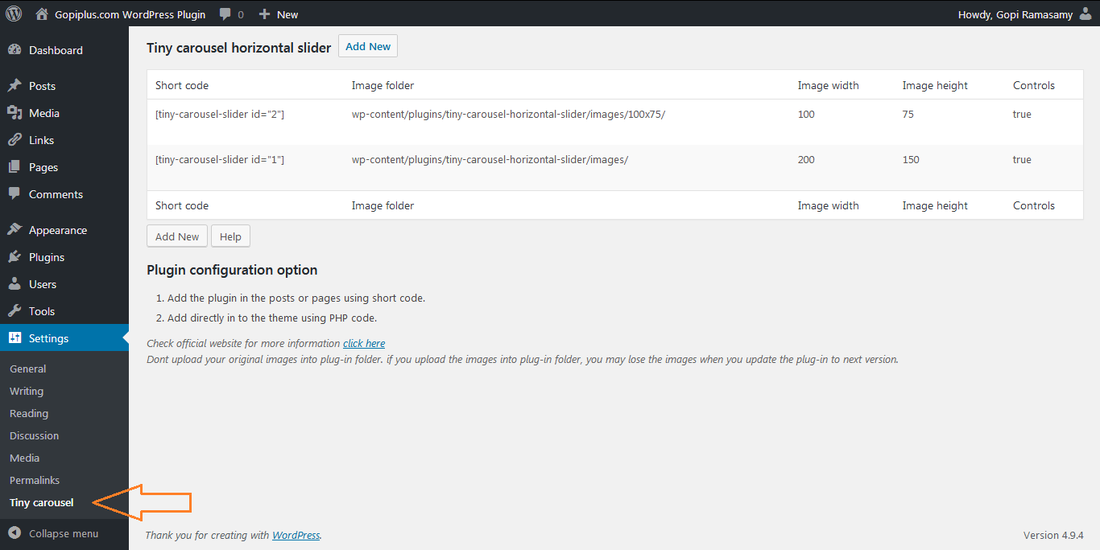
This is Jquery based image horizontal slider plugin, it is using tiny carousel light weight jquery script to the slideshow. in the admin we have option to set image folder location and gallery style. in this plugin there is no option to add description for the images. also we have many horizontal sideshow plugin in this website, please have look.
Features of this plugin
- Easy to customize.
- Support all browser.
- Automatically pauses on mouse over.
- Short code available for pages and posts.
- Supports navigation by button.
- Option to set number of images to move at a time
- Option to set a interval for automatic slide.
Live demo
Installation instruction
Usual wp plugin installation.
Plugin administration
Dashboard → Settings → Tiny carousel
Activate the plugin and go to above mentioned path in your WordPress dashboard to plugin management.
Slider Width: Enter your galley width.
Image Width: Enter images width (We should upload the same size images in the folder)
Image Height: Enter images height (We should upload the same size images in the folder)
Display: Enter how many images you want to move at a time.
Controls: Want to use the Left, Right arrow button?
Interval: Auto interval to move one image from another.
Interval Time: Auto interval time in millisecond.
Duration: Animation duration in millisecond.
Image Folder Location: Enter your image folder location. Please Don’t upload your original images into this default folder instead you change this default path to original path, also don’t upload any images in the plugin folder. you may loos the images when you update the plugin.
Plugin configuration
Add directly in the theme: Add the below PHP code in your theme PHP file, for example if you want to add this slider in your website footer, just activate the plugin and add this code in footer.php file.
<?php echo TinyCarousel(’1′); ?>
Short code for posts and pages: Use the below short code in the pages and posts to render the slideshow.
[tiny-carousel-slider id="1"]
Frequently asked questions
Q1) How to change the arrow button?
Use can replace the new arrow image in the plugin folder.
wp-content/plugins/tiny-carousel-horizontal-slider/buttons.png
Q2) What type of image file formats can i use?
You can upload *.JPG, *.JPEG, *.GIF, *.PNG
Q3) Any special instruction?
Yes, Don’t upload any sideshow images in the plugin folder. your may lost it when you update the plugin.


This plugin breaks my theme. It causes my posts to display text all over the place on the front page. I’m wondering if it’s something odd with the theme called “iGames”? I’d like to have a horizontal gallery of thumbnails at the footer of my site, something like the footer on this website:
http://www.eurogamer.nl/articles/2012-04-09-civilization-v-gods-and-kings-krijgt-releasedatum
If you have suggestions or another plugin for this, please let me know.
This may be conflict of the theme CSS.. pls try on different page..
Nice plugin.. working nice on my website footer..
Hello, nice plugin, just want to know how to center the slider in a page or post.
Thanks a lot!
P.S. : centering the shortcode in html don’t work
I can see the scroller but it is not picking up the images, just showing broken images. Even the default one showed broken images. Any ideas?
Hello Admin,
The Image path is correct, yet i am not seeing images. Only the arrows. What else could be wrong?
Take the view source and check the image path.. and let me know the link
For some reason the file names have been converted to all caps. Why is that?
ok. it’s not working with my template. i switched it to the twenty ten theme and it works fine. Can you suggest where in my template i can edit to make it work? Thanks for your plugins.
Hi
I cannot get this to work with my Thesis Footer. It only shows one image, does not scroll and the arrows are aligned vertically on top of each other.
This is the code:
function custom_footer() {
if (is_front_page()) {
?>
<?php
}}
add_action('thesis_hook_footer', 'custom_footer', '1');
Result http://www.s3lab.co.za
Hi,
Image do not show up in theme1516? Is it not compatible with this theme?
Also can you hyperlink the images to go to other pages?
Thanks
Share the theme, so we can look and and get back..
plugin is not working
and when i feel the form for getting download link from mail, a link shows as “expired link”, when i am tried to download from wordpress.org, only the previous and next buttons shows on page or post, images are not shows.
i am uploading the images in right folders.
try now..
Dear admin,
i seen many comments like above of mine, they have also same problem “images are not shown” – if the plugin is not working properly then kindly repair it else remove this plugin – that’s why another haven’t wast their time.
another plugins are fantastic, also your work is highly appreciated, main thing is that you provides plugins in “FREE”.
keep it up (y)
Hi, i have checked your mails and found there is issue on your image location.. please help to check your image folder location and try again..
dear admin,
according to description shown on setting page of the plugin, i have been set a path same as it or also even tried this path :
wp-content/images/
but still it doesn’t work, kindly check by uploading in test theme from your site.
Hi, just i found the UPPER case issue on the image URL. i will update the plugin soon.. in the mean time you can use the .JPG , .GIF files.. (file extension should be in upper case)
bonjour
J ai installé ce jour le plugin, qui ne fonctionne pas.
j ai entre le code [Petit-carrousel curseur id = "1"], mais celui ci s affiche sur la page et je n ai pas de carousel….
ai je fais une mauvaise manœuvre…
merci d support
Hi, is it possible to use this on an existing gallery and is it possible to show the images in a lightbox slideshow when they are clicked on?
hi there Admin or Gopi , i see that a year ago that you were planning on adding a shortcode option to post this plugin on a page or post. has that happened yet?
please advise
nevermind i meant that for the information reel plugin
ok thanks..
Loving this plug in. Its perfect for what I want but it would be really really useful if there was a way of putting a URL against each image. Is this possible? Or is there any alternative that has the same layout as this plug in?
Thank you in advance!
We will try to add this option in the next release..
Gopi, thanks for your great work with these WP plugins. For Tiny Carousel Horizontal Slider, can it be used more than once in a web site – e.g image folder 1 on page a, image folder 2 on page b, image folder 3 on page c? Or multiple times on same page? Also, is it possible to use zoom effect so that when carousel is stopped by user and an image clicked, it displays larger image with fancy zoom?
No, You can not use multiple times on the same page…. But you can create different gallery for each page.
OK, thanks, I now have different galleries on 3 different pages. But last image gets cut short so experimenting with settings. Where is the CSS file to change padding between images?
To prevent cutting off last image, had to repeat first image at end of sequence. I need images to appear in correct sequence. They are named 1-[imagename], 2-[imagename], etc and were saved in correct sequence for timestamp – but they display in random order (OK on my own localhost but not on live server). How can I fix this please? Here is test page:
http://hoxtonindustries.com.au/newsite/packaging-services/shrink-wrapping/
Is there a way to customize the plugin so that media items that have a category or tag to show up in the slider versus routing it to a folder?
Hi. I’ve got the carousel to show on my homepage and look the way I want it. But the javascript doesn’t seem to be working. It doesn’t slide automatically and the buttons don’t work.
Also, in the admin, to make the buttons appear I have to choose Controls = False. Shouldn’t that be the other way around?
anybody knows if it’s working with Classipress theme ? I’ve tried,install it,did the settings, but when I put the code into the files they give back an error….is there something I have missed ?
Thanks for help
Plugin is not working if called in html page using
How to fix it??
Please share more info
Very nice plugin, works fine. Question: can I make those images clickable? I’d like to link them to some of my site’s pages.
Thanks!
Gopi, I’ve just downloaded Information Reel Message Scroller; looks good, thanks.
I have a question: I am looking to put a multi image slider (with text option next to image) on a new WP site using WP Shop template. Thinking of Tiny Carousel. Will this take up to 50 images? each approx half the width of images shown in Demo? Can I add text alongside the image (eg Textbox)? Alternatively, please let me know which of your plugins will do this.I will be putting the horizontal slider just under the header display. Thanks, Denis
Hi, This plugin don’t have text option. “Superb slideshow gallery” you can try this plugin for image/text.
Is there a way to make this loop instead of going back to the beginning? Would like it to just continue—going back to #1 after the last image…
Thanks!
Is there a way to add links to the images?
This plugin don’t have link option. Please try “Image horizontal reel scroll slideshow” plugin
I can’t get the images to appear in the order I want. How does the code determine the order the images appear?
I have “random” turned off, so I’m not sure why it’s ignoring the filenames, etc.
Thanks!
Hi,
This plugin is really fine ! Exactly what I searched but.. If I have several sliders on the same page, only the first one is working… Others just stand on the first picture..
I’ve seen something weird in the source : everyone has the same ID (#tiny-carousel-slider1) whereas in the backoffice anyone is called this way (but “[tiny-carousel-slider id="5"]“”[tiny-carousel-slider id="4"]“, etc…)
Can you help me ? Does anyone get this issue ?
At present we can add one slider per page only.
Hi,
This plugin is good.
I use this plugin in my post. Its working nice.
But if i use this plugin in frontpage.php , the plugin is not working. Just image only showing.
i’m using themia-lite theme.
So help me to solve this issues.
Thanks!!!
Please check your java script. I think because of the JQuery conflict. Please comment the Jquery load from the plugin file and try again.
This plugin sounds interesting and I think that it would be even more interesting if it is responsive.
I hope that you take this into consideration in your next version.
Very nice though and thanks for the good work.
This plugin is really fine ! Exactly what I searched but.
y the arrow don`t function when I click it?
is it related with js
http://temp.merryfair.com/?post_type=portfolio&p=132#
Your latest version in the WordPress respository is an empty zip file.
Please make a note of it.
I am getting this error. Please help me
Warning: is_dir() [function.is-dir]: open_basedir restriction in effect. File(..) is not within the allowed path(s): (/home/fourze/public_html:/usr/lib/php:/usr/local/lib/php:/tmp) in /home/fourze/public_html/wp-content/plugins/tiny-carousel-horizontal-slider/tiny-carousel-horizontal-slider.php on line 81
Only one image shows up and the arrows or the “slide” don’t work.
The imagesfolder lays under http://www.mywebsite.se/blahablaha/blahaha/imagesfolder and all the images is saved JPG.
I got the latest version of WP and using the theme newshun and also uses the plugin Easing Slider for something else I don’tthink it’sa conflict between them two.
This is urgent, I need an answer at the end of this day or I’ll get another plugin. My website is up and running and it can’t look like shit for long time.
(Sorry for my bad english gramma)
Why do you answer some of the questions and some not?
Bad manners!
Heavy work, Some time can reply some time cant, but am trying to reply all the comments..
I respect that you’re busy but you can start with answer the questions one by one in order instead of jumping over 2-3 questions and answer the 4th question.
EX
Question1
Question2
Question3
Question4
Answer
Why don’t do it this way instead?
Question1
Answer
Question2
Answer
Question3
Answer
Question4
That’s said,it’s an great plugin if it would workand it could work great if you could answer the questions.
I don t want to use arrows (left or right) but it doesn ‘ work ! If I put true or false , every time I see arrows !
there is a something wrong with this plugin …
Hi Gopi,
Great plugin, exactly what I was looking for. I have though 2 issues :
1. The left arrow doesn’t appear – it’s in the code (even the link works) but I can’t seem to be able to have it appear
2. The right arrow keeps blinking in an annoying way
You can see the plugin @ work here – http://atwild.com/ and I can submit the admin setting if needed.
Thanks
Amit
Hi Amit,
Just saw your link. it looks you have changed the button image. but not in the correct format. please check existing image and your button image, you can find the difference.
Thanks a lot ! I didn’t realise it was a sprite image…missed that ;-(
Have another question if I can – is there a smart way of attaching links to each image ? can I attach a post to each one somehow ?
Thanks again,
Amit
i want to display two image groups in same page,kindly let me know how add the php code [short code wont work in pages] ,kindly let me know ASAP
I tried both
1. tiny carousel and
2. Image horizontal reel scroll slideshow,
both are not displaying more than one gallery in same page.
Please help, I am working on a project, but i can not figure out what the images are not showing even thou. I have disable all the plugin to find out the conflict one but can not please help.
Site is http://ldbf.tanatekinc.com
Thank you.
Olu
What if I only want this carousel to be dropped in Homepage only? Any code for that please.
Great plugin, but I am unable to use it for any of my projects since there is no way to link the photos.
HI
after transfer code to real server i am not able to create slider. plz help
how can we place href to each image with the text below each image
Hi,
Is it a bug or something I have set wrong ? in the carousel I am using (http://atwild.com) if you scroll to the right till the last set of images, the last image gets cut off – you can see just a part of it, any ideas what might cause that ?
Thanks,
Amit
Hi,
Is there a way to have the images from a custom post types appear at the gallery ?
Thanks,
Amit
Hi dear,
Your plugin is wonderful. First upon i appreciate you for creating this plugin and gave us as free.
In my new website have your this plugin. the main problem i am facing that, the images in the slider is always on sliding. I want to stop its sliding and it will slide only on clicking its arrows. otherwise i dont want to slide.. Will you help me ?.. I am waiting for your reply. Please do it as early as possible.
plugin not showing in the widget panel. already acitvated. am using wp 3.5.1
Hello, Thank you very much for your wonderful plugin, when the plugin show all pictures it goes back from beginning , how about if we want to continue without fall back from beginning? and it continues like cycle
Hello!
Really like the plugin! Thank you for that!
But i would really like to know if it is possible to display the images in a LOOP? Instead of it going back tot the beginning.
Please answer my question, saw 3 other people with the same question, would be NICE!
Installed the plugin, but
#1… where am I supposed to upload so that I an inlcude the URL for where they are located in the plugin page?
#2… I want to run the Tiny Carousel in the sidebar above the blog on my homepage. But I don’t know which widget to use. I’ve entered in TEXT or IMAGE widgets, but it’s not working.
Meant to say “where am I supposed to upload my image files to create a gallery or library” (to ultimately have a URL for where all those image files are located?)
Hello admin,
i would like to paste this horizontal slider in my website. But i dont use WordPress. So i use the dreamweaver to programm my website. It is possible to use your skript in dreamweaver to show the same result?
Unfortunely it couldn’t work, i think i did something wrong.
If you give me an manual to integrate this code on my website i would be very happy.
Thank you alot in advance.
It works well, but i want to slide images in continuous loop, it should not rewind.
like 1>2>3>1>… continue but not reverse.
Can any one know how can i do that?
Thanks.
how do I change the order of the images? It seems to only go in a random order and I can not seem to be able to change this.
A Blogger template that would work great for a parenting blog, children’s book blog, or teacher’s blog.
Lubith provides you with an extended typography: over 400 fonts are available to select from, some of them support additional scripts (Latin Extended, Cyrillic,
Greek, and Vietnamese). * If you have more than one blog you can access them all
through the one blogger dashboard.
Feel free to visit my website :: jarida theme Free download
I’ve marked the show controls to False but it still displays the arrows. How do i remove them?
Hi, Brad, just add
#tiny-carousel-slider1 .buttons {
display:none !important;
}
to your main theme css file, and they will not be shown, not sure if it will have the same id (#tiny-carousel-slider1), check your page code.
Hi, developers, can you please tell in which order slider picks up images? I see this question have been asked few times already, but there is no reply, if it always random, just tell this please.
How can I change the css for the carousel. I want to adjust the position of the slider, I’ve tried to add css for the slider in the main css for my site, but it still reads from another source which I can not find. Also I need to change the space between the images
Alex
I wanted to let you know that when I try to change the plugins working directory for the images the plugin fails on load. I have used a php do_shortcode call, and have changed the relative folder location to a location inside of my theme. Why is the plugin not working? Please email me if you know of a solution.
its possible to make carousel clickable?
you can stop the scrolling and only use the arrows?