
Article title slider Joomla module lets you create the sliding news display using your article title. This is a nice fashionable way to show all your latest article titles to your users. We have the option to select four different types of sliding. In the module admin section, we have the option to filter articles by category and tags. Also, we have the option to view/hide feature articles and display order options.
Feature of this module
- Easy installation.
- Simple and portable.
- Easy scroll setting.
- Option to select by category and tags.
- Option to choose display order.
- Option to select random order.
Module live demo available below. You may also be Interested in RSS title slider Joomla module.
Live Demo 1
Live demo 2
Module installation instruction
1. Download Article title slider Joomla module from the download location. Select the correct ZIP file depends on your Joomla version.
2. Login into the administrator section of your Joomla site.
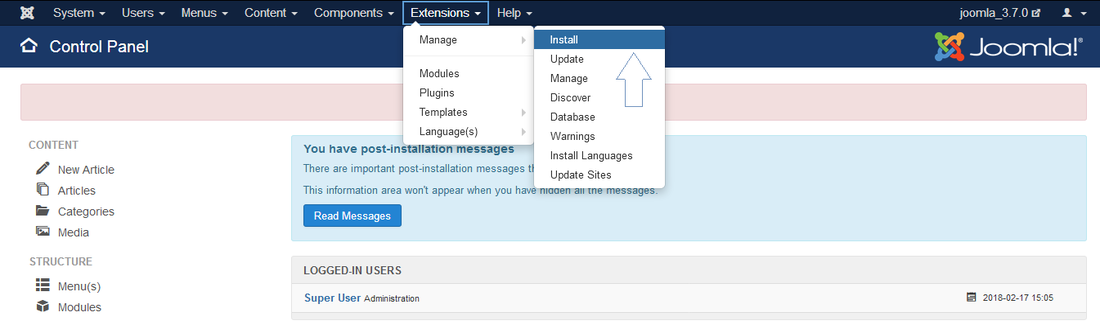
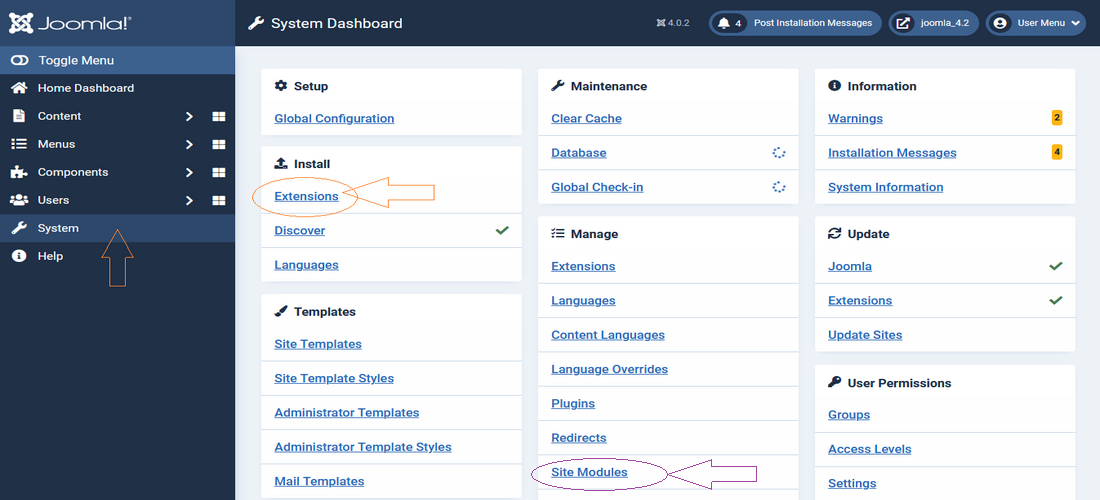
3. In the menu, Go to System, Install and then click the Extensions menu.
4. Click Browse and select the module you downloaded, then click Upload & Install button.
5. When your Joomla module has been uploaded and installed successfully, you will see a confirmation message.
Admin screen for Joomla 3.7
Admin screen for Joomla 4.0
Creating a new module instance
In your Joomla admin go to the Site Modules (System, Manage in your admin menu). You should see the module Article title slider listed among the others. Simply click on the module name to open the module editor.
If you cannot find an instance of your new module, click the new button. The new module should be listed among the types available, select the Article title slider which will create a new instance.
Module parameters
Go to Extensions, Module, and select the module from the list, then click the module tab to set up the module parameters. Check the below screen.
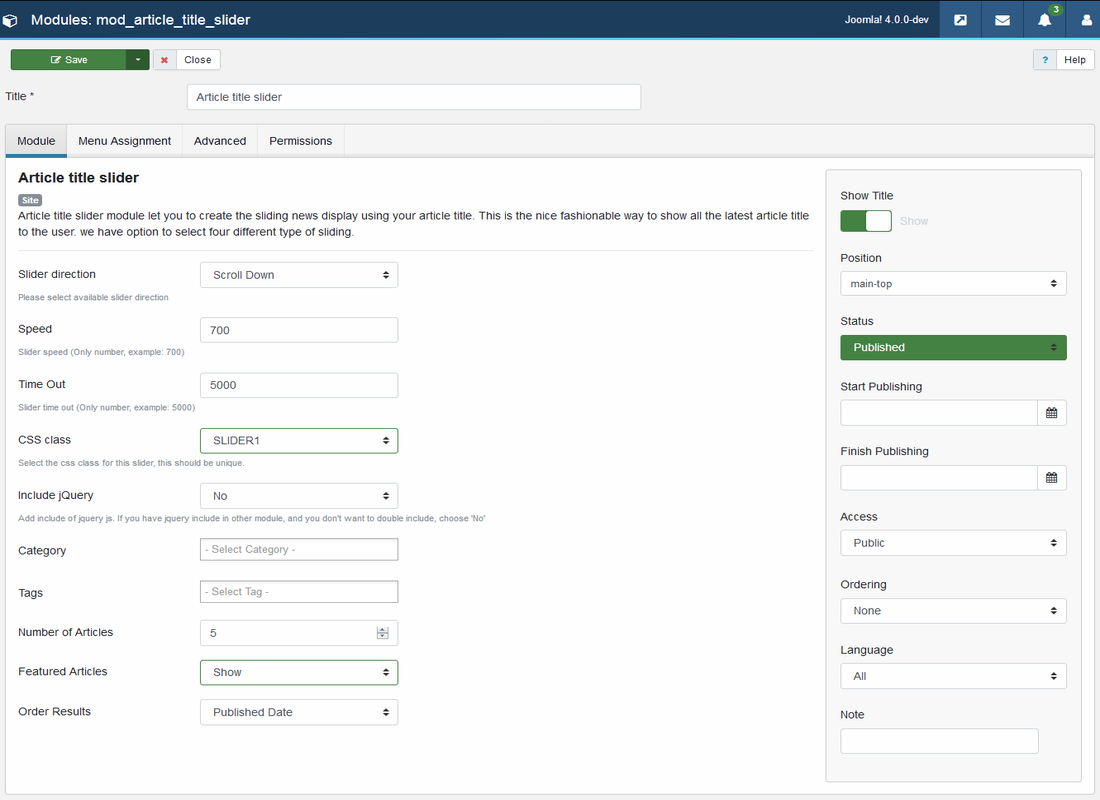
Slider Settings
Slider direction: This is to set the slider direction.
Speed: This is to manage the slider speed (Only number).
Timeout: This is to manage the slider delay (Only number).
CSS class: This is to define the display style (select a unique class for each slider).
Article Setting
Category: Enter article category to filter.
Tags: Enter article tags to filter.
Number of Articles: Enter the number of article titles to display in the slider.
Featured Articles: Select featured articles display option.
Order Results: Select article scroll display order.
jQuery Setting
This module using jQuery for cycle news, If you have jQuery include in other modules, and you don’t want to double include, choose NO in this option.
Frequently asked questions
Q) How can I change the display style?
In this module, we have separate CSS file and that CSS file contains 10 class, each class is for one setting. that is, in the admin, we have 10 settings and each set have individual CSS class which is defined in this style sheet.
/mod_article_title_slider/css/ mod_article_title_slider.css
Q) How can i change the slider direction?
This option is available in the admin setting, please refer to the above screen.
Module official page
http://www.gopiplus.com/extensions/2012/04/article-title-slider-joomla-module/
Download location
http://www.gopiplus.com/extensions/download/
Joomla page
https://extensions.joomla.org/extension/article-title-slider/