Vertical scroll recent article
June 19, 2011 | Posted by: admin | Joomla Plugin | 46 Comments
Vertical scroll recent article module scroll the article title in the website, the article title scroll from bottom to top vertically. This is the best and fashionable way to show all the latest article to user. No coding language required to setup this module. in the admin we have option to enter article category.
Feature of this module
- Easy installation.
- Simple and portable.
- Easy scroller setting.
- User can set the newest post at sidebar.
- It’s scrolling so it occupies less space in sidebar.
- Option to select the category.
- Option to choose order.
- Option to select random order.
Live working demo available on the sidebar. Do you want the same scroll for the RSS feed? use continuous rss scrolling joomla module.
Installation and configuration
- Download the Vertical scroll recent article module from the download location.
- Log into the administrator section of your site.
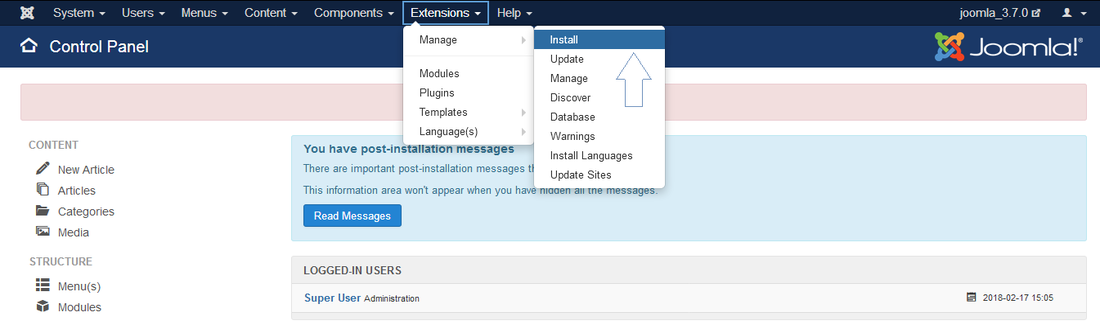
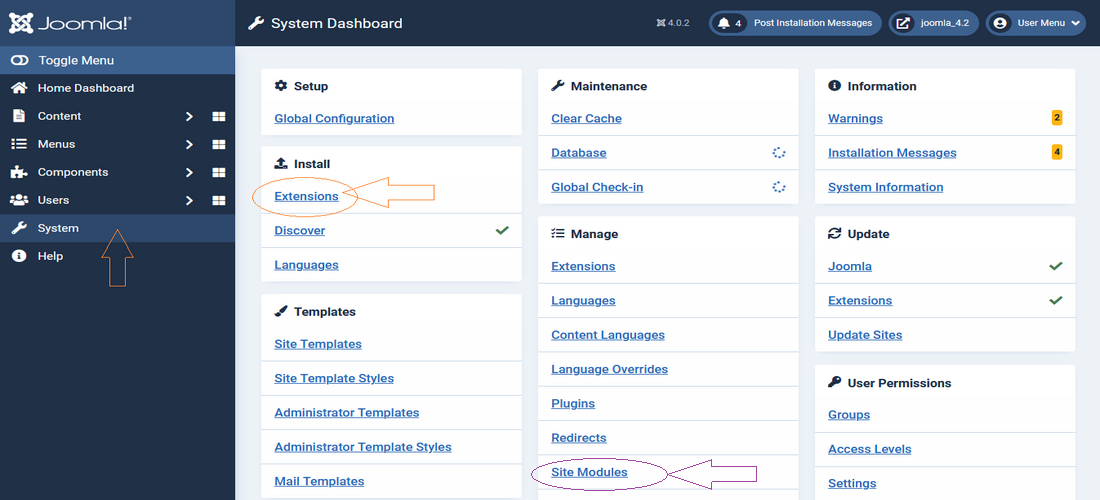
- Go to Extensions → Extension Manager.
- Browse and upload the available zip file.
- Install module by pressing “Upload File & Install” button.
Creating a new module instance
In your Joomla admin go to the module manager (Extensions → Module Manager in your admin menu). You should see the module vertical scroll recent article listed among the others. Simply click on the module name to open the module editor.
If you cannot find an instance of your new module, click the new button. The new vertical scroll recent article module should be listed among the types available, select vertical scroll recent article which will create a new instance.
Module parameters
Height : Height of the single article title in the scroll.
Display no: No of title you want to display in the scroll at the same time.
Category id: Give the category id you wish to select the articles. Multiple categories can be separated by coma.
No of items: No of items to display.
Order field by: Field to sort.
Order by: Sorting order.
No of chars: No of chars to display, leave 0 for all characters.
Use joomla cache: Set to Yes if you need to enable joomla cache for this module.
Joomla parameters
Title : It is essential to set a title for the module.
Position : The position on the page where the module will be displayed.
Status : The module needs to be published in order for it to display.
Module Assignment : Assign the module to all pages.
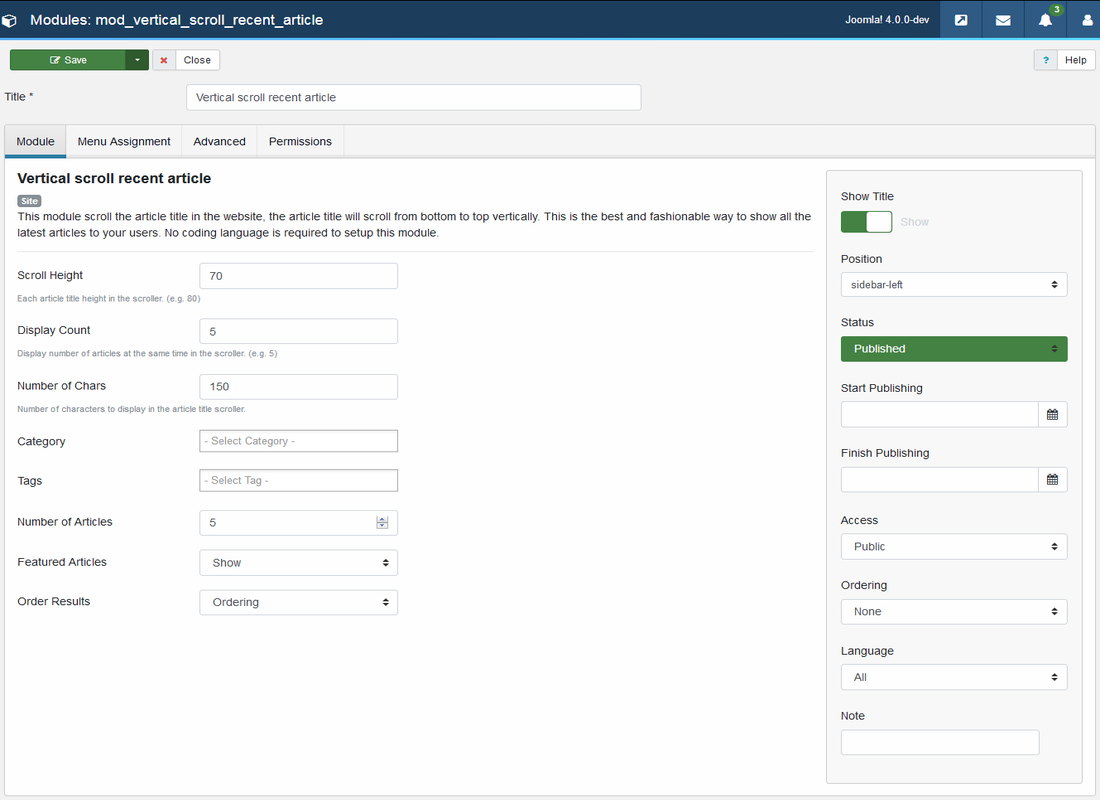
Module admin screen
The right hand column displays parameters that are specific to your module vertical scroll recent article.

Frequently asked questions
Q1) How many numbers of recent posts title will scroll?
We have option to enter number of post we want to select from the database.
Q2) How many numbers of recent posts title will display at same time?
Go to Module manager → Vertical scroll recent article → Module parameters , in this area you can find the option to update the setting.
Q3) How to arrange the scroll setting?
Go to Module manager → Vertical scroll recent article → Module parameters , in this area you can find the option to update setting.
Download location
Donation
All modules, plugins in this website is completely free. If you find the software useful please consider making a donation(PayPal). All donations will go towards improving this web website and maintenance.
Comments (46)


Nice plugin. its working nice for me..
How to choose to let it show the recent post? My scroll shows all the article and i could not choose categories or section.
I am trying to use your vertical scroll component. but i am getting this error.
Warning: mysql_real_escape_string() [function.mysql-real-escape-string]: A link to the server could not be established in /home/eventdia/public_html/demo/modules/mod_vertical_scroll_recent_article/tmpl/default.php on line 154.
Tried on several other website. Please any idea what could be the cause
download the latest version.. and this will support joomla 1.5+
Hi, I would love to see the possibility to add module crome (Module Class Suffix) to this module. It works as a charm this one. Highly recomended!
//Peter
You might have written a really thought-provoking article. Your content material speaks to me and I share inside your views. Several writers tend not to compose authentic material, but you’ve got truly carried out a terrific job with this information.
How stop scroll on mouse over link ?
How change scroll speed ?
I liked as much as you will receive performed proper here. The caricature is tasteful, your authored subject matter stylish. nevertheless, you command get got an shakiness over that you want be handing over the following. sick for sure come further before again since precisely the same just about very incessantly inside case you defend this hike.
By me, only the title of the module shows up. None articles is being listed at all. Tried to pick some other category ID’s but nothing happens.
BTW: Downloaded the mod for joomla! 1.7, as I’m running a site with joomla 1.7
Still trying to find out why this component for Joomla 1.7 don’t work under Joomla 1.7. It don’t list anything.
i running it on joomla 1.7, i have downloaded the plug in for joomla 1.7.. but It don’t list anything. anyone help me? thanks
I am very enyoyed for this weblog.Its an iformative topic.it support me really much to sove some troubles.Its chance are so fantastic and working style so speedy.I consider it might be assist all of you. Thanks.
Great module, works as stated. Is it possible to clone it and change it to soon to end articles?
Very Great module, i have a question
It’s possible set the format date.
dd/mm/yy HH:SS
@$vspost_created = mysql_real_escape_string($item->created);
I install your module and got mysql_real_escape_string() [function.mysql-real-escape-string]
its the lastest version 1.5.
tkx
Could not list any article for Joomla 1.7, with module 1.7… Please help.
It works like a charm, very easy to configure…and fast to get it working, which is perfect.
I’d just suggest that it could allow Module Class Suffixes in next versions. But anyway, I’m very grateful for your hard work. Thank you so much
It doesn’t show up any contents in Joomla 1.7
Yes, Its not working with joomla 1.7…
Can anyOne help me pls……..
Wow ! nice website for the great data you may have right here, I have added your site to my web favor. and I will keep an eye on it, Thanks for sharing.
Hi,
the module works on joomla 1.5 site but it don’t works on joomla 1.7 site, how I can to solve the problem?
Thank you
Yayo
is it possible that it can take SEF URL.. ? now it is taking as index.php?option=com_content&view=article&id=894
please help
WILL IT SCROLL THE CONTENT OF A ARTICLE??
Hi,
Love the concept of your module, but can’t get it to work. The module box appears where I want it to be, but I can’t seem to get the content to appear in the box. It stays blank. The site is a Joomla 1.7 site and it has not yet gone live. The DNS does not yet point to this new site. Could that be part of the reason nothing shows?
Will you get mad if I quote your article on my Self Help Forum? I would think this article suits my topic perfectly. Well ya, thanks for posting this article.
Definitely, what a great website and revealing posts, I definitely will bookmark your blog.Have an awsome day!
the scroller is showing but the article titeles are not displayed. how can I solve this?
Fantastic guides here. I am excited to check out more!
Fantastic information here. I am excited to read more!
I saw quite a bit of site but I believe this one holds a little something more in it. ?°Laughter could be bereaved if snobbery died.?± by Peter Ustinov.
Warning: mysql_real_escape_string() [function.mysql-real-escape-string]: Access denied for user ‘klit4293′@’localhost’ (using password: NO) in /home/klit4293/public_html/basuma.com/modules/mod_vertical_scroll_recent_article/tmpl/default.php on line 154
Warning: mysql_real_escape_string() [function.mysql-real-escape-string]: A link to the server could not be established in /home/klit4293/public_html/basuma.com/modules/mod_vertical_scroll_recent_article/tmpl/default.php on line 154
Warning: mysql_real_escape_string() [function.mysql-real-escape-string]: Access denied for user ‘klit4293′@’localhost’ (using password: NO) in /home/klit4293/public_html/basuma.com/modules/mod_vertical_scroll_recent_article/tmpl/default.php on line 158
Warning: mysql_real_escape_string() [function.mysql-real-escape-string]: A link to the server could not be established in /home/klit4293/public_html/basuma.com/modules/mod_vertical_scroll_recent_article/tmpl/default.php on line 158
Warning: mysql_real_escape_string() [function.mysql-real-escape-string]: Access denied for user ‘klit4293′@’localhost’ (using password: NO) in /home/klit4293/public_html/basuma.com/modules/mod_vertical_scroll_recent_article/tmpl/default.php on line 154
Warning: mysql_real_escape_string() [function.mysql-real-escape-string]: A link to the server could not be established in /home/klit4293/public_html/basuma.com/modules/mod_vertical_scroll_recent_article/tmpl/default.php on line 154
Warning: mysql_real_escape_string() [function.mysql-real-escape-string]: Access denied for user ‘klit4293′@’localhost’ (using password: NO) in /home/klit4293/public_html/basuma.com/modules/mod_vertical_scroll_recent_article/tmpl/default.php on line 158
Warning: mysql_real_escape_string() [function.mysql-real-escape-string]: A link to the server could not be established in /home/klit4293/public_html/basuma.com/modules/mod_vertical_scroll_recent_article/tmpl/default.php on line 158
Warning: mysql_real_escape_string() [function.mysql-real-escape-string]: Access denied for user ‘klit4293′@’localhost’ (using password: NO) in /home/klit4293/public_html/basuma.com/modules/mod_vertical_scroll_recent_article/tmpl/default.php on line 154
Warning: mysql_real_escape_string() [function.mysql-real-escape-string]: A link to the server could not be established in /home/klit4293/public_html/basuma.com/modules/mod_vertical_scroll_recent_article/tmpl/default.php on line 154
Warning: mysql_real_escape_string() [function.mysql-real-escape-string]: Access denied for user ‘klit4293′@’localhost’ (using password: NO) in /home/klit4293/public_html/basuma.com/modules/mod_vertical_scroll_recent_article/tmpl/default.php on line 158
Warning: mysql_real_escape_string() [function.mysql-real-escape-string]: A link to the server could not be established in /home/klit4293/public_html/basuma.com/modules/mod_vertical_scroll_recent_article/tmpl/default.php on line 158
Searched too much on web but got it here.
Thanks for your effort!
Blepharitis Treatment
Concept is great and just what I need!
Only thing is I can’t get it to work! The modules is showed on the website, but there are no article titles showed… How can I fix this?
Me too. Any idea to fix this?
HAs anyone worked out why the articles won’t display?
I have the same problem with Joomla 2.5. No articles are
shown.
Has anyone seen a fix for this in 2.5 ?
Hey there, I believe your internet site may be possessing browser compatibility problems. When I check out your blog website in Opera, it appears fine but when opening in World-wide-web Explorer, it has some overlapping. I just wished to present you a fast heads up! Other then that, wonderful weblog!
I don’t see de parameters you said.
I have:
Each scroller height in scroll
Display number of record at the same time in scroll
Enter max character for each article
Category ID
Ordenar
Sufijo de la clase del módulo
I want to set the number of article to show, but I can’t. I’m using J1.5
I’m glad you chose to share your difficult operate with people today like me. I?ˉve been seeking for this details and right up until now I only observed it confusing. Thank you.
Hi, is an excelent pluguin…how can i put more than one element en the same page, when i put 2 or more only the first one scroll…tanks
Hey there, I believe your internet site may be possessing browser compatibility problems.
When I check out your blog website in Opera, it appears fine but when opening in World-wide-web Explorer, it has some overlapping.
I just wished to present you a fast heads up! Other then that, wonderful weblog!
It’s not working in 2.5. Seems like it doesn’t get the article title.
Part of source code:
crs_array[0] = ‘‘;
Having the same issue in 2.5. The html is rendered, you can see it when you view page source however, no text, links, headlines are displayed.
Has anyone worked out why the articles won’t display in Joomla 2.5?